



Your website may look perfectly fine.
Pages load. Forms work. Customers can find you. Nothing appears to be broken.
But underneath your website is software that needs to be maintained just like the software on your computer or phone. For millions of websites, one of the most important pieces of that technology is PHP.
If your hosting company, developer, or WordPress dashboard has warned you that your PHP version is outdated, it is not something you should ignore. An outdated PHP version can affect your website’s security, speed, compatibility, and reliability.
And there is another important consideration: simply changing PHP versions without checking your website first can sometimes cause things to break. Here’s what business owners and website managers need to know.
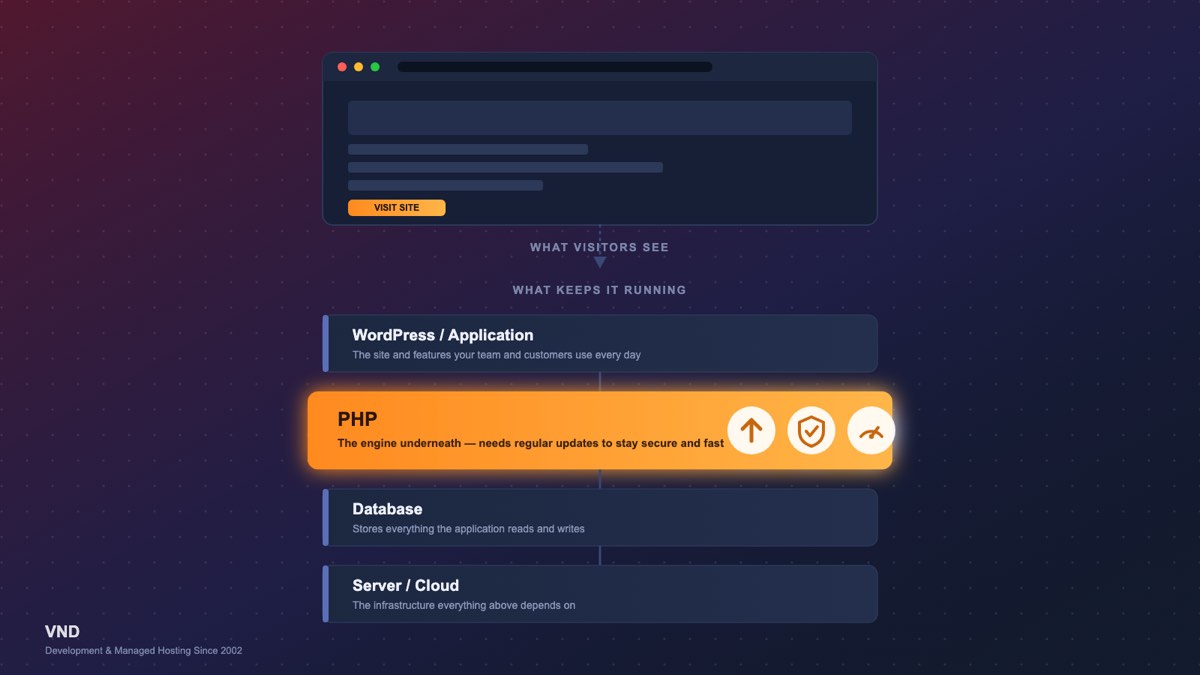
PHP is a programming language that runs behind the scenes on millions of websites and web applications.
Think about your website like a car. The pages, images, menus, and content are what you see from the driver’s seat. PHP is part of the engine underneath the hood.
When someone submits a contact form, logs into an account, searches a website, retrieves information from a database, or completes another dynamic action, PHP may be processing that request behind the scenes.
PHP is particularly important because WordPress is primarily built with PHP. It is also widely used for custom web applications and frameworks such as Laravel.
At VND, PHP is part of the technology stack we use for everything from WordPress websites to back-end development, custom applications, portals, APIs, and database-driven business systems.
This is not just routine housekeeping. The PHP and WordPress ecosystems continue to move forward.
PHP 8.2, for example, reaches official end of life on December 31, 2026. After that date, it will no longer receive official security support. The official PHP support lifecycle explains when each supported PHP branch moves from active support to security-only support and then end of life.
At the same time, WordPress continues moving toward newer PHP releases. The current WordPress technical requirements recommend PHP 8.3 or greater.
That means businesses running older websites should not assume that because a site works today, its underlying technology is still in good shape.
Security is probably the most important reason to keep PHP current.
When a PHP version is actively supported, vulnerabilities discovered in it can be addressed through security releases. Once that version reaches end of life, those official fixes stop. That difference is real — PHP continues to publish security and maintenance releases for supported branches as issues are fixed.
Older PHP is also frequently a sign of a bigger maintenance problem. When VND evaluates an older website, we often need to look beyond PHP at WordPress itself, plugins, themes, custom code, database versions, SSL, server software, backups, and security configuration — the kind of gap a broader managed IT review is built to catch before it becomes an incident.
A secure website is an ecosystem. Keeping only one piece current is not enough. Businesses that want a broader look at their public-facing security posture can also request a VND Cyber Score Review.
Modern PHP releases have introduced substantial improvements in efficiency compared with much older generations. That can mean faster processing and more efficient use of server resources.
For visitors, that can contribute to faster website responses and a better experience. For businesses, performance becomes particularly important when a website handles e-commerce, customer portals, membership systems, search tools, API integrations, or high traffic.
PHP is not the only thing affecting website speed, however. Hosting infrastructure, caching, databases, images, plugins, third-party scripts, CDNs, and application code all play a role.
This is one area where VND’s combination of web and application development and managed hosting and server infrastructure experience becomes particularly useful. We can look at both the application and the environment running it.
Your website does not use PHP by itself. WordPress, plugins, themes, development frameworks, and third-party services evolve alongside it.
Developers eventually stop supporting very old PHP versions because maintaining backward compatibility becomes increasingly difficult.
Over time, businesses can begin encountering problems such as plugins that can no longer be updated, new software that requires a newer PHP version, third-party integrations that stop supporting the existing environment, or hosting companies that retire outdated PHP versions.
WordPress itself is a good example. WordPress 7.1 was released in August 2026, while WordPress now recommends PHP 8.3 or greater as its modern baseline.
The web keeps moving even when your website does not.
Consider two websites.
One has been maintained regularly. PHP, WordPress, plugins, and other software have been updated incrementally.
The other has been mostly untouched for six years.
The first PHP upgrade may be relatively routine. The second might uncover an abandoned theme, outdated plugins, deprecated PHP code, incompatible integrations, or custom functionality that has not been tested against modern software.
That is technical debt. Waiting does not necessarily eliminate the cost of maintaining technology. It often pushes that cost into the future, when the problem can be larger and more expensive to solve.
As of September 2026, PHP 8.2, 8.3, 8.4 and 8.5 remain officially supported, although they are at different stages of their support lifecycle.
PHP 8.2 reaches end of security support on December 31, 2026. PHP 8.3 continues receiving security support through 2027, while PHP 8.4 and PHP 8.5 have longer support windows. You can verify the current dates on the PHP supported versions page.
That does not mean every website should immediately jump to the newest PHP version available. The goal is to run a supported and secure PHP version that has been properly tested with your website or application. That last part matters.
Yes, it can.
The PHP upgrade itself is not necessarily the problem. An upgrade can reveal code that was written for an older PHP version and is no longer compatible with newer versions.
Potential problems can come from older WordPress plugins, abandoned themes, deprecated PHP functions, custom code, third-party integrations, database connections, or older application frameworks.
This is why we do not recommend blindly changing the PHP version on an important production website. A successful upgrade starts with testing.
For a business-critical website, VND prefers a controlled process.
We first review the existing environment, including the PHP version, hosting environment, WordPress or CMS version, plugins, themes, custom code, database, and other important dependencies.
The site and database should then be backed up. Whenever practical, we create or use a staging environment so the upgrade can be performed away from the live website.
Once PHP is updated, we do not just check whether the homepage appears. We test the functionality that actually matters to the business, such as contact forms, logins, search, checkout processes, payment gateways, customer portals, APIs, scheduled processes, administrative functionality, and other custom features.
Only after compatibility has been verified should the production environment be updated. And after deployment, the website should still be monitored for errors or unexpected behavior.
One misconception we frequently encounter is that maintaining WordPress means periodically logging into the dashboard and clicking Update.
There is considerably more happening underneath a business website. WordPress itself, PHP, databases, web servers, plugins, themes, SSL certificates, DNS, caching, backups, security tools, and hosting infrastructure can all affect the reliability of the site.
Sometimes the problem is WordPress. Sometimes it is PHP. Sometimes it is the database or server. Sometimes it is custom code. And sometimes several of those things are interacting.
VND provides WordPress support and website maintenance as part of a broader development and infrastructure practice rather than treating WordPress as an isolated website builder.
Businesses also operate custom PHP applications that may have been built many years ago and still perform critical functions today.
These can include customer portals, internal systems, reporting applications, membership platforms, e-commerce systems, database applications, API services, and legacy business software.
Older custom software may require more planning than a typical website because the application’s code itself may need to be modernized.
VND works with both existing applications and new development. Our custom software development services allow us to determine whether an application simply needs an infrastructure upgrade or whether portions of the software should also be modernized.
PHP runs on a server. That means your website’s security and performance are directly connected to the environment hosting it.
VND is different from many website development companies because we work on both sides of that equation. Our team develops and maintains applications while also providing hosting and infrastructure services.
That gives us the ability to examine both the software and the infrastructure running it when diagnosing a problem.
If you manage your own hosting, the PHP version can often be found inside your hosting control panel. WordPress administrators may also see PHP information or warnings through WordPress Site Health.
But you do not necessarily need to figure this out yourself.
If you have received an email from your hosting provider saying your PHP version is being retired, WordPress is displaying an outdated PHP warning, or your website simply has not received much technical maintenance in several years, it is worth having the environment reviewed.
The worst time to discover that your website depends on obsolete technology is after something stops working.
PHP upgrades should ideally be routine preventative maintenance, not emergency projects.
Keeping the technology behind your website current can help improve security, maintain compatibility, improve performance, reduce technical debt, and make future development easier.
And you do not need to become a PHP expert to do it. That’s what we’re here for.
VND has been developing, hosting, supporting, and maintaining websites and custom applications since 2002. Our team works across PHP, WordPress, Laravel, databases, servers, cloud infrastructure, cybersecurity, and custom software development.
VND can review your website, determine which PHP version it is running, identify potential compatibility issues, and recommend the safest path forward.
Whether your site is hosted with VND or somewhere else, contact VND and let our team take a look.
Your website may not need to be rebuilt. It may simply need some overdue maintenance.
VND is dedicated to helping our clients with solutions that work. We offer customized pricing for companies big and small, no matter the industry. Tell us more about your project to get started.